
Your movies live on the computer at home. Open one web address and your whole library is there, on mobile data, at a friend’s place or in a hotel.
YOUR FAMILY’S ADDRESS
Every Beebo gets its own free web address that never changes, like yourname.beebo.tv.
The owner sees the exact address on the app’s Get Started screen, under “Watch away from home”, with a QR code. Share it with your household once, and everyone uses it from then on.
STEP 1
On your phone, tablet or laptop, type your yourname.beebo.tv address into any web browser, or scan the QR code from the owner’s Get Started screen.
STEP 2
The ones the owner made for you on the home computer. Never the password of whoever pays for Beebo. Continue Watching stays yours, on every screen you use.
Don’t know the web address? Go to login.beebo.tv/find, type the email of whoever pays for Beebo, then your own name and password. Beebo finds the right home for you.
In the phone app it is the same: put that email in the Home box, then your own name and password.
Some houses prefer one shared pass for everybody. That still works: leave the name blank and type the pass. It is deliberately not the owner’s account password, it can’t touch the subscription or the settings, and the owner can change it whenever they like.
Don’t have a login? Ask the owner to add you. See Add & manage people.
Owner? Sign in with your Beebo account, and set a shared pass at yourname.beebo.tv/household if you want one.
STEP 3
Your full library loads, just like at home. It streams over the internet, so it uses your data plan when you’re not on Wi-Fi.
Install it for one-tap access. Tap Install app or Add to Home Screen so Beebo gets a real icon. Full steps are in Get Beebo on your phone.
One install works everywhere. Once Beebo is on your phone, it connects through your home Wi-Fi when you’re home and switches to your .beebo.tv address when you’re out, automatically.
FOR THE OWNER
Your .beebo.tv address is free and automatic. It comes online a few seconds after Beebo starts, and you’ll see it with its QR code on the Get Started screen.
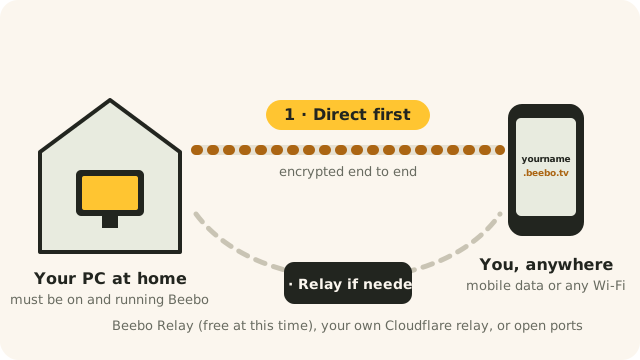
Direct first. Beebo always tries a direct connection, straight from your computer to your phone, encrypted end to end.
Not sure it’ll connect? A few home networks don’t allow the direct route. Run the connection test on your home computer to find out.
If direct isn’t possible, Beebo can try automatic UPnP, or you can use your own Cloudflare relay or open ports on your router — all free. Beebo Relay is an optional fallback if none of those work for you; it is in Beta and works today, but paid plans are Planned and not available to buy yet (see pricing). A relay passes your video along but can’t see it.
That local address only works on the home Wi-Fi. Away from home, use your yourname.beebo.tv address instead — it’s built for exactly this.
First, the home computer must be on and running Beebo — it’s your server. Give it a few seconds after Beebo starts. If it still won’t connect, the owner can turn on the temporary remote access backup in Get Started, or restart Beebo on the home PC. To find out whether your home internet lets it through at all, run Will Beebo work on your internet? on the home computer.
This is a known open problem, labelled In development: the design is done and the first server step is being built, but nothing has been released yet. Sign in again after a reload. It is separate from the “Keep me signed in on this browser” box on the sign-in page served by your own Beebo PC (added in Windows 0.1.110, tested by automated tests and reviews only), which is a different feature and is not the fix for this page. Also, a repair for a same-network connection timeout is in Windows 0.1.110 (automated tests and two source reviews). On one test PC, after the update, a same-network connection through the personal address connected twice in a row through Beebo Relay (6.5 and 6.7 seconds); that does not show the cause or that other devices are fixed. We do not promise every connection problem is solved.
Yes — off Wi-Fi it streams over your mobile data, like any streaming app. To avoid data use entirely, download movies to your phone while on Wi-Fi first (available in the Android app), then watch them offline.
Yes. Everyone, including you, must sign in with an approved account to see anything — and your video files never leave your computer; they’re streamed on demand. The owner controls exactly who has a login in the Users tab.
Usually not. That’s the point of the .beebo.tv address — on most home connections it connects without any router setup. Some stricter connections need one port opened; this check tells you which kind you have, using your computer and your phone.
Yes — different people can stream different things at the same time, each signed into their own account.